

This model
U1 Lite
Stationary Interaction
Deployment profile
- Upper body for fixed dialogue stations
UBTECH · UWORLD
A permanent home for human-like dialogue.
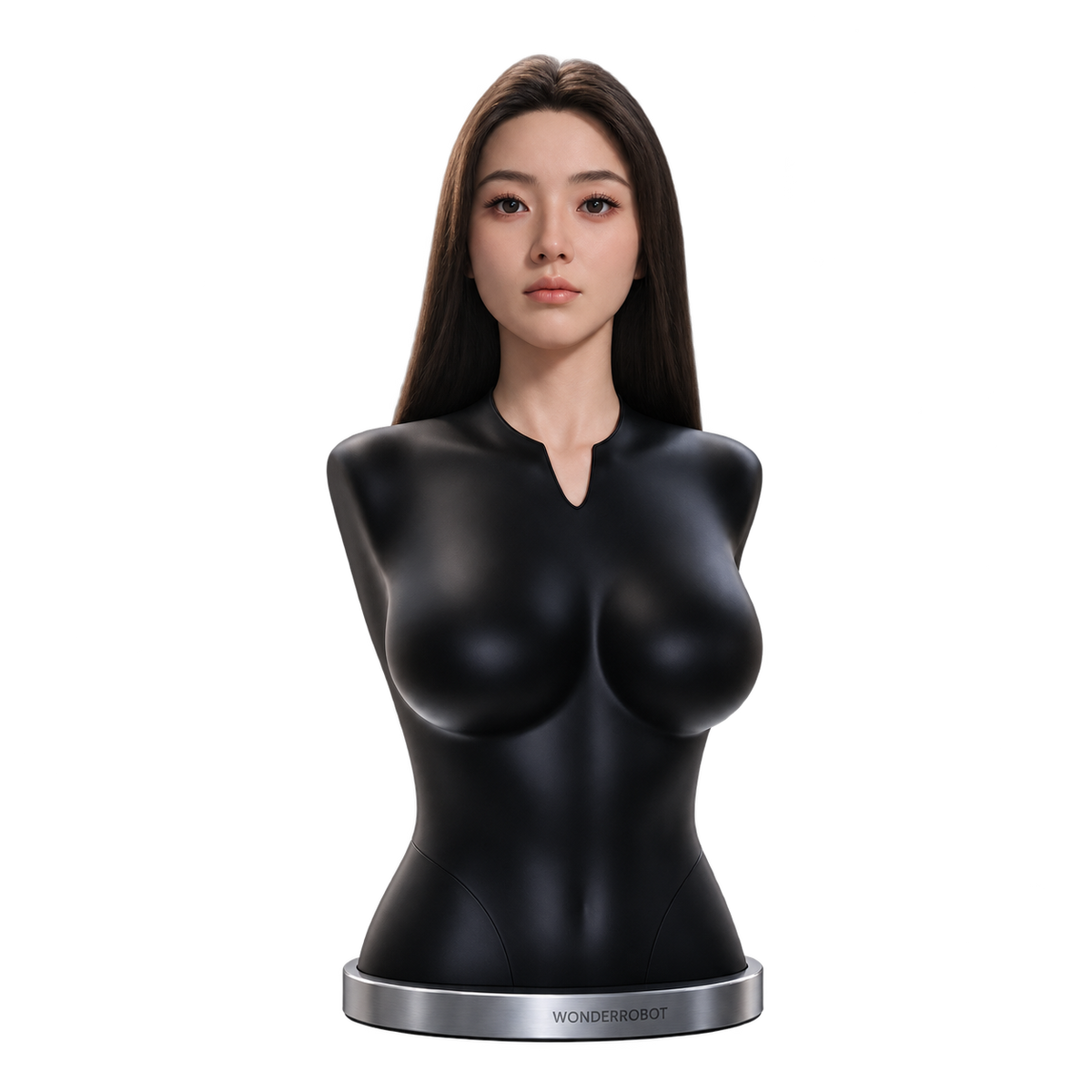
The UBTECH UWORLD U1 Lite is the upper-body version of the U1 series. It is suitable for supervised deployment concepts with a fixed point of interaction, such as at the reception desk, at a dialogue station, or in a showroom.
The semi-torso design guides the planning. Installation height, mounting, sightlines and power supply are considered from the outset. The spatial role remains clear, even when several visitors approach the station at the same time.
Briefly describe your operating location, the desired scenario, and the timeframe. Terra Robotics will work with you to determine the right solution and the next steps.
The location, interactive features, and software integration will be coordinated to meet the desired specifications. For public demonstrations, we plan for supervision and appropriate distances.
Compare the design and intended use of the four versions.
Stationary Interaction
Deployment profile
Full-body presence
Deployment profile
Femininely designed Ultra version
Deployment profile
Masculine-designed Ultra edition
Deployment profile

A clearly defined greeting point with a handover to the reception team.

A staffed station makes the interaction concept tangible in a brief dialogue.

A pre-arranged conversation starter leads to a personal sales call.

A permanent interpretation station supplements the content of a specific exhibit.

A limited product dialogue in the consultation zone creates an additional touchpoint.

A repeatable setup helps encourage dialogue, eye contact, and acceptance.
The UBTECH UWORLD U1 Lite is a highly advanced bionic upper-body robot that combines a human-like appearance, natural facial expressions, and emotion-oriented artificial intelligence in a compact platform. With a system weight of around 13.5 kg and a total of 38 degrees of freedom, the U1 Lite enables expressive human-robot interaction without the need for the complex locomotion mechanics of a full-body humanoid robot. Its realistic bionic skin, movable facial muscles, and intelligent gaze control make it particularly attractive for stationary communication, presentation, and demonstration applications.
The UBTECH U1 Lite is particularly suitable for stationary robotics demonstrations, technology showrooms, corporate presentations, trade show appearances, interactive exhibitions, and the study of human-robot interactions in research and education. Its compact design allows it to be used in environments where a mobile full-body platform is not required.
| Technical Feature | Specification |
|---|---|
| Manufacturer | UBTECH Robotics |
| Model | UWORLD U1 Lite |
| Design | Bionic upper-body robot |
| System weight | Approx. 13.5 kg |
| Degrees of freedom | 38 DOF |
| Neck mechanics | 5 DOF, two pivot points |
| Facial muscles | 19 active degrees of freedom |
| Facial expressions | More than 30 micro-expressions |
| Outer material | Biomimetic silicone skin |
| AI language model | Resonance-LM |
| Memory system | Memory Agent system |
| Lip synchronization | Under 20 ms (manufacturer's specification) |
| Connectivity | Wi-Fi |
| Battery life | 2–4 hours (manufacturer's specification) |
| Locomotion | Stationary, no independent locomotion |
Technical specifications according to published manufacturer information. The actual scope of functionality may vary depending on the configuration and software version.
Advantage for professional users: The UBTECH U1 Lite combines modern conversational AI with a physical, human-like user interface. Companies, research institutions, and technology providers can use it to evaluate innovative interaction concepts without having to deploy a mobile full-body platform. The combination of bionic facial expressions, intelligent speech processing, and compact mechanics makes the U1 Lite a specialized solution for stationary social robotics.
UBTECH offers the UWORLD U1 as a Lite upper-body model, a Pro full-body model, and a highly dynamic Ultra full-body model. We will coordinate the exact scope of delivery and the selected version within the project.
Manufacturer's UWORLD model overview · UBTECH's presentation of the U1 series
Terra Robotics · A brand of Terra Connect GmbH
Zeißstraße 10 · 32584 Löhne · Germany
mail@terra-robotics.de · Company details
Please provide the exact model designation and the intended location of use in your request. For the offered configuration, clarify the applicable safety and operating documentation, as well as the conditions for installation, demonstration, and operation in the presence of the public.
Robot safety for your project · Coordinate use and demonstration

Stationary upper-body version. Installation height, mounting and connections are coordinated at the intended location.
UBTECH describes facial expressions and voice-based interaction as the core of the series concept. We confirm the features available for the selected model for the project.
The setup, duration of operation, supervision, and planned sequence will be determined for the specific application.
We agree on the technical specifications, language options, software access, and required documents for the proposed version.

The semi-torso design guides the planning. Installation height, mounting, sightlines and power supply are considered from the outset. The spatial role remains clear, even when several visitors approach the station at the same time.

The U1 series concept combines language-based interaction with human-like facial expressions. Languages, specific dialogue functions, and the handover to a team member are part of the pilot acceptance testing.

A supervised conversation point can be combined with a clear visitor flow and a defined handover to staff.

For the Lite, a fixed point of interaction is central. Test the line of sight and conversation distance at the intended reception or exhibition venue.


Briefly describe your operating location, the desired scenario, and the timeframe. Terra Robotics will discuss the appropriate version and the next steps with you.
The Lite is designed as a top-only version for permanent installation. We will determine the suitable support and installation height for your location.
This depends on the design, the space available, and the approved connections. Dimensions and pictures of the counter are helpful for a preliminary assessment.
If the fully human-shaped body is an essential part of the presentation, it is worth comparing it with the U1 Pro.
Please provide the model, organization, location, and process. Terra Robotics will clarify the scope for a demonstration and determine the appropriate line item in the proposal.
The available languages and voices depend on the confirmed configuration. German-language dialogues can be tested in advance against your typical conversation scenarios.
Dimensions, weights, performance data and operating life are confirmed for the offered version and configuration. Please provide the duty cycle and mode of operation.
The available interfaces depend on the software version and scope of delivery. Please let us know which systems you would like to connect and which actions are required.
Location, supervision and operational procedures determine the requirements. The necessary documentation and responsibilities will be agreed upon before the project is approved.
Check whether the planned use processes audio, video, or dialogue data. Data flows and responsibilities depend on the configuration actually used.
The scope of delivery and services are listed in the quote. Please specify the desired support for assembly, training, and subsequent operation.
The UBTECH UWORLD U1 Lite is suitable as a starting point for a humanoid reception robot at a fixed location. In a showroom, at a trade show counter, or at an exhibition, eye level, conversation duration, and the handover to staff are key. Use the pilot project to test how short greeting and information dialogues can be integrated into the existing visitor flow.
In the UWORLD U1 series, you can also compare the UWORLD U1 Pro, UWORLD U1 Ultra Female, and UWORLD U1 Ultra Male. Our comparison of humanoid robots categorizes additional designs for business and research.
For the Lite, planning begins with the location. A reception counter has different requirements than a freestanding exhibition piece. It is crucial that sightlines, installation height, and access for the supervising person are considered in the initial design. Photos of the location and dimensions of the intended area help to define the setup early on.
A fixed station can take on a clearly defined task in the visitor journey. A sensible start is a greeting with a short menu of topics and a clear handover point. During pilot operation, you can observe which questions are actually asked and at which points a team member should take over.
For a comparison with the U1 Pro, the visual impact in the space is crucial. The Lite focuses on contact at a fixed point. As soon as the overall appearance of a full-body robot is to be part of the presentation, the Pro version can be compared using the same conversation scenario.
The team should best define the scope of action before the demonstration. This includes the greeting, handling unplanned requests, and clearly ending the dialogue. For highly frequented locations, visitor guidance is just as important as the content of the conversation.
The pilot also shows how accessible the station is under different acoustic conditions, typical visitor numbers, and various operating heights. A suitable position is evident when the dialogue helps the operation and keeps waiting areas and walkways clear.
At the beginning, the team should formulate what a visitor should take away from the interaction. This could be initial orientation, an introduction to a product conversation, or the communication of specific content. This results in a process that requires only a few clear roles. Also describe situations in which a member of the team remains responsible. This gives purchasing, project management, and operations a common basis for selection.
For a reliable assessment, images, floor plans, and information on typical visitor numbers are helpful. Include sightlines, lighting, clear walkways, and access to the installation site. In case of heavy foot traffic, waiting areas, entrances and exits, and the role of supervision in the process should be discussed in advance. Plan the necessary area from the perspective of the users and the technical team. During a pilot appointment, the assumptions about the location can then be systematically checked.
A demonstration is most useful when concrete test criteria are established in advance. Define typical dialogues, the time sequence, representative noise conditions, and the required reactions. Let the team observe several runs and document which steps can be reliably repeated. Also record when a moderator should intervene or take over. The results can then be compared with the requirements that purchasing places on the specific offer item.
For the dialogue, language selection, pronunciation, and the maintenance of conversation content are just as important as the initial demonstration. Write down typical questions and names and test their clarity with real users. Clarify who updates the content after the introduction, how changes are tested, and how the conversation management handles unexpected questions. A simple example is the handover to a person as soon as it comes to an individual appointment or a concrete request for a quote.
If a project connects to existing systems, the requirement should be described concretely. Specify the systems, the required functions, the data sources, and the responsibility for technical operation. Also clarify which functions require a network connection and which can be operated on-site after confirming the scope of delivery. If planned use of a microphone or camera is intended, data flows, responsibilities, and the configuration actually used at the location must be checked.
Before ordering, the model, configuration, required operating time, location, and associated documentation should be agreed upon in writing. In addition, the question of how the operation is monitored, who sets up the device, and how to proceed in case of interruptions must be addressed. For public locations, the intended movement area and the duties of supervision also play a role. The technical offer should clearly indicate the project-related points and refer to the concrete scope of delivery.
For a successful handover, the responsible team needs clear instructions. This includes operation, preparatory checks, and the necessary contact channels in case of a malfunction. Defined roles are particularly helpful when service providers or different shifts are involved. Document how the operation is started and ended, who can approve adjustments, and how a new operating environment is assessed in advance. Also ask in the offer about the options for technical support during a pilot.
Use the needs assessment for your robotics project to coordinate the location, task, and desired demonstration date. For the assessment of the location and operation in public, you can find more information under Robotics Safety. If you are planning a development setup for human-robot interaction in parallel, the overview of the Physical AI Starter Kits offers an introduction to the selection of robotics and AI hardware.

